Flipper Zero with Momentum: A Review Before BSides Canberra Source
Markdown source•
1---2title: "Flipper Zero with Momentum: A Review Before BSides Canberra"3date: "2026-09-18"4published: true5tags: ["security", "flipper-zero", "momentum", "bsides", "hardware", "rfid", "electronics"]6author: "Gavin Jackson"7excerpt: "Getting ready for BSides Canberra with the original Flipper Zero: my experience with Momentum, RF remotes, NFC, USB tools and the iOS app, plus Wi-Fi, Ethernet and the upcoming Flipper One."8---910# Flipper Zero with Momentum: A Review Before BSides Canberra1112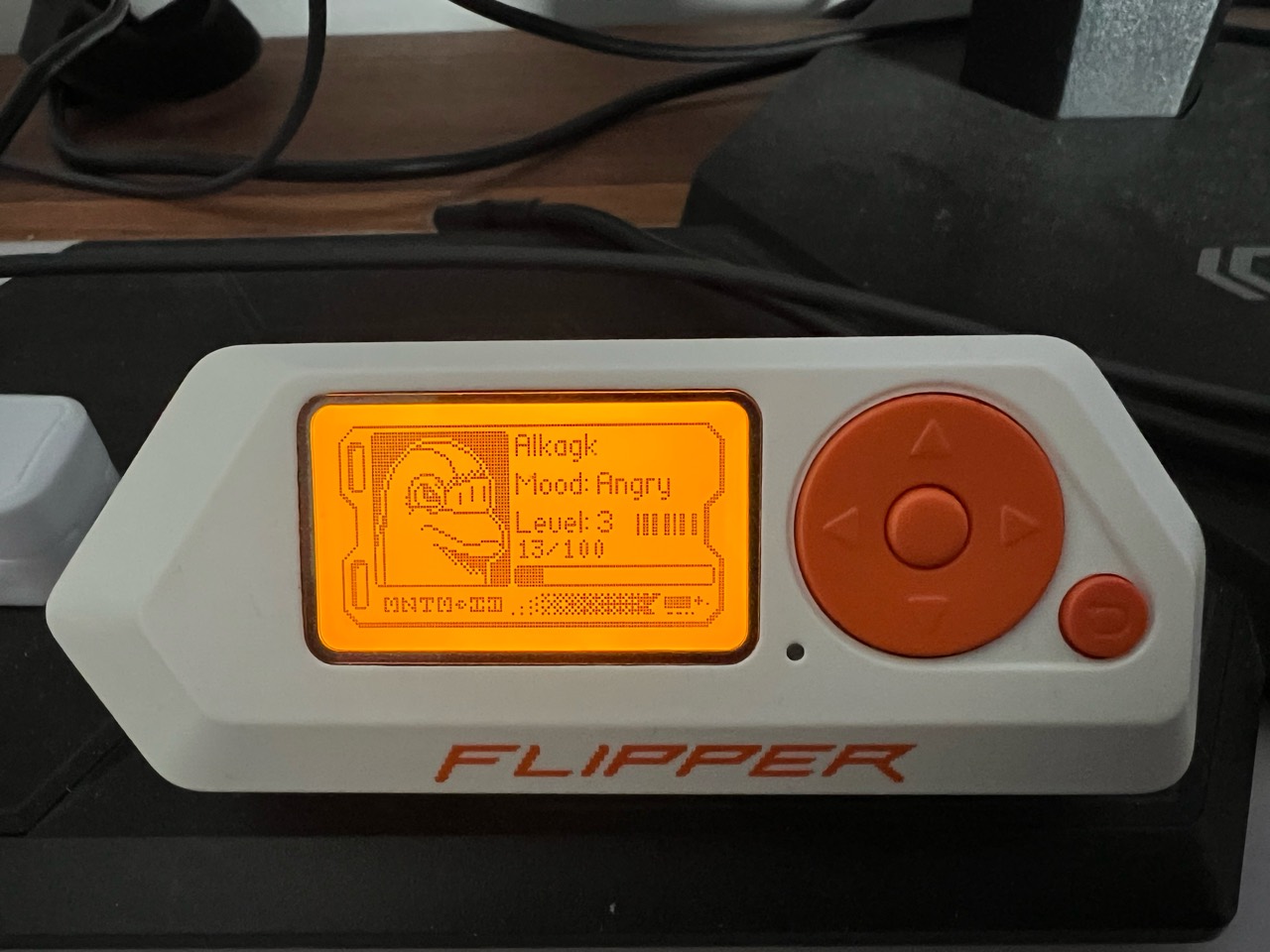1314*My original Flipper Zero running Momentum, with the dolphin's profile on screen.*1516[BSides Canberra](https://bsidesau.com.au/) is on next week, from **24 to 26 September 2026**, and I have been looking at the original Flipper Zero with the Black Bag challenge in mind.1718There is a particular satisfaction in taking something you normally use without thinking about it, such as a garage remote or an access card, and getting a glimpse of the conversation happening underneath. That is where the Flipper has impressed me most. It makes radio signals, card readers and USB device behaviour accessible enough to experiment with.1920Mine is running **Momentum firmware**. I have used its RF capabilities to record signals and operate a variety of devices, including my garage door. I have also used the NFC tools to unlock my e-scooter and clone my work bike locker card, played with Bad Keyboard and the mouse wiggler, and enjoyed the fact that this little device can double as a USB drive. The iOS application has been another pleasant surprise.2122The obvious gap is networking. There is no built-in Wi-Fi or Ethernet, which becomes more noticeable when thinking about a conference challenge involving several different technologies. Those are the additions I want to explore next.2324## What the original Zero gets right2526The [Flipper Zero](https://flipper.net/) puts a useful collection of interfaces into one small handheld: sub-GHz radio, 125 kHz RFID, 13.56 MHz NFC, infrared, iButton, Bluetooth LE, USB and GPIO. It has its own display, buttons and battery, so basic exploration does not require a laptop.2728That integration is its strongest feature. Specialist tools can go further in individual areas, but the Zero makes it easy to move between several kinds of hardware without rebuilding the workbench each time.2930It is also worth understanding the scale of the hardware. This is a microcontroller device with a small monochrome screen, rather than a pocket Linux computer. The [official specifications](https://docs.flipper.net/zero/development/hardware/tech-specs) list a 64 MHz application processor and 256 KB of shared SRAM. That is plenty for the focused jobs it was designed to do, but it helps explain why a full network-analysis environment needs more than another menu item.3132The dolphin gives it some personality. The useful part is what sits behind the animation.3334## Momentum makes it a more flexible toolkit3536[Momentum](https://github.com/Next-Flip/Momentum-Firmware) is community firmware built on the Flipper firmware ecosystem. Its additions include interface customisation, extra applications and protocol support, expanded Bad Keyboard functionality, and disk-image management.3738For this review, that distinction matters: I am describing the original **hardware running Momentum**, so some of the software features are different from the standard out-of-the-box experience.3940What appeals to me is being able to keep experimenting with the same device as my interests change. One day that means a remote control, another day a card, and another day a USB utility. The firmware and app ecosystem give the hardware more room to grow.4142There are still physical limits. Installing Momentum does not add a Wi-Fi radio, an Ethernet controller or unlimited processing power. Expansion hardware and compatible software are needed for those jobs.4344## RF: the garage door makes it real4546The sub-GHz tools were one of my most useful experiments. I have recorded signals and used the Flipper to operate several RF devices, including opening my own garage door. Seeing a familiar piece of hardware respond is a much better introduction to radio protocols than reading a feature list.4748There are several separate steps hidden inside the phrase “RF scanning”: detecting activity, identifying a signal, recording it, and successfully transmitting something the receiver accepts. Success at one step does not guarantee the next.4950The protocol matters. Simple fixed-code systems and rolling-code systems behave differently; a rolling-code receiver is designed to reject an already-used transmission. Flipper's [supported-vendor documentation](https://docs.flipper.net/zero/sub-ghz/supported-vendors) distinguishes static and dynamic protocols. My garage result is an account of what worked with my setup, rather than evidence that any garage door can be opened by recording its remote.5152There is also a legitimate pairing route for some systems: the Flipper can become an additional remote through the receiver's normal enrolment process. That is a different operation from replaying a capture, and is covered in the [official guide to adding remotes](https://docs.flipper.net/zero/sub-ghz/add-new-remote).5354The larger lesson is how much implementation detail sits behind an apparently simple button. Once the Flipper makes that visible, an ordinary remote becomes something worth understanding.5556## NFC: the scooter and the bike locker5758My other satisfying experiments have been using NFC to unlock my e-scooter and cloning my work bike locker card. These are everyday interactions, which makes them particularly effective demonstrations of what the device can do.59606162*Emulating the saved MIFARE Classic 1K entry for my e-scooter.*6364“Clone” is a convenient shorthand, but it can describe different things. Reading a card, saving its data, emulating it from the Flipper, and writing a compatible replacement card are separate capabilities. The result depends on the card technology and what the reader checks.6566Flipper's [NFC documentation](https://docs.flipper.net/zero/nfc/read) makes those limits clear: depending on the card and the available data, it may emulate the card or only its identifier. Protected data and authentication still matter. Recognising a card does not mean the device can reproduce everything required to use it.6768I would not infer the exact security design of either of my systems from a successful interaction alone. What the experiment does provide is a useful reason to look more closely at how an access system identifies and authenticates a credential.6970## Bad Keyboard, a mouse wiggler and a USB drive7172I have also spent some time playing with **Bad Keyboard** and the mouse wiggler. They demonstrate another side of the Flipper: a computer can see it as an input device.7374Momentum's Bad Keyboard supports scripted keyboard interaction over USB and Bluetooth. It makes the trust placed in keyboards very tangible: the host receives input, and what that input can do depends on the session and its permissions. The mouse wiggler is a simpler example of the same general idea, generating pointer activity.7576The USB-drive functionality is especially neat. With the **Mass Storage** application, the Flipper can present a disk image stored on its microSD card as a USB drive. Momentum adds tools for managing those images and opening them in Mass Storage. It is an extra useful role for hardware I already have, rather than something I would buy solely to replace a memory stick. These features are described in the [Momentum project documentation](https://github.com/Next-Flip/Momentum-Firmware).77787980*Mass Storage and Mouse Jiggler: two of the smaller utilities that make the Flipper useful beyond radio and NFC.*8182Together, these utilities help explain the appeal of the device. Radio and access cards attract attention, but the smaller everyday tools give it reasons to stay within reach.8384## The iOS app deserves more attention8586I was impressed with the iOS application and how it lets me interact with the Flipper from my phone. A handheld gadget feels much more complete when the companion software is useful too.8788The [official mobile app](https://docs.flipper.net/zero/mobile-app) connects over Bluetooth LE and provides remote control, access to saved cards and remotes, and data-management features. That larger interface is welcome when the alternative is working through everything on a tiny display.89909192*The Apps tab in the Flipper iOS app makes it easy to browse tools by category.*9394The phone remains a controller for the Flipper. The Flipper's hardware still performs the radio or card interaction, so Bluetooth range and proximity to the target device still matter. The app does not turn the iPhone itself into a sub-GHz transmitter.9596It is a good pairing: the Zero supplies the unusual interfaces, while the phone supplies a familiar screen and a more comfortable way to manage them.9798## Adding the missing Wi-Fi99100The lack of built-in Wi-Fi surprised me. It is easy to see “wireless multi-tool” and assume Wi-Fi is included, but the Zero's built-in radios serve different purposes.101102The official [Wi-Fi Developer Board](https://developer.flipper.net/flipperzero/doxygen/dev_board.html) is one way to add the missing hardware through GPIO. It uses an **ESP32-S2**, which provides **2.4 GHz Wi-Fi**. Its supplied firmware is intended for development and debugging; attaching it does not automatically turn the Zero into a Wi-Fi auditing appliance.103104For that kind of exploration, a well-established community option is [ESP32 Marauder](https://github.com/justcallmekoko/ESP32Marauder/wiki/Flipper-Zero). Marauder runs on the ESP32 board, while a companion app on the Flipper provides the controls. Its [documented tools](https://github.com/justcallmekoko/ESP32Marauder/wiki/Applications) include wireless discovery and packet-capture functions, with availability depending on the board and firmware combination.105106The arrangement has two software components to match: the firmware on the external board and the application on the Zero. Momentum's [app collection](https://github.com/Next-Flip/Momentum-Apps) includes a Marauder companion and an ESP flasher, which makes this a natural avenue to investigate from my current setup.107108Third-party boards offer other combinations of radios and connectors. I would choose one against the exact Marauder compatibility documentation, especially if the aim is to explore bands beyond 2.4 GHz. The official ESP32-S2 board will not gain 5 GHz support through a firmware update.109110This also overlaps nicely with my recent experiments with [small ESP32 devices](/post/three-small-esp32-devices-home-assistant). A compatible Wi-Fi expansion looks like a useful next project.111112## Can it scan an Ethernet network?113114There is a wired expansion route too: a **W5500 Ethernet module** connected through GPIO/SPI. The module supplies the Ethernet interface and RJ45 connection; the Flipper application determines what can be done with it.115116For my Momentum setup, the most straightforward starting point is **Ethernet Troubleshooter**, included in the Momentum app collection. Its [documentation](https://github.com/Next-Flip/Momentum-Apps/blob/dev/eth_troubleshooter/README.md) describes DHCP and ping tests using a W5500 Lite module. That is useful for checking whether a network connection works, but it is a narrower job than discovering hosts and scanning their ports.117118Jose Pacheco's [Flipper Zero Ethernet adapter build](https://www.linkedin.com/pulse/building-flipper-zero-ethernet-adapter-red-teamrecon-jose-pacheco-f7kdc/) is a practical example of mounting a W5500 module on a protoboard and checking for a live port, a DHCP lease and gateway reachability. It illustrates the connectivity-testing use case rather than a full port scan.119120For actual scanning, the separate [Flipper Zero LAN Tester project](https://github.com/dok2d/fz-W5500-lan-analyse) documents ARP host discovery, TCP port scanning, and LLDP/CDP neighbour information, alongside other diagnostics. Those are much closer to the capabilities I had in mind. However, its stated firmware requirement is the **official firmware**, so I would need to establish compatibility with my Momentum build before relying on it.121122The expansion details here come from project documentation. A W5500 board alone does not guarantee that a particular application will run on my firmware, so the software requirements are part of the buying decision.123124For a quick check at a network port, a tiny handheld could be handy. For a more involved investigation, a laptop still offers a larger display, mature tools and more room to work with the results.125126> **Flipper One: a companion to the Zero**127>128> 129>130> *Flipper One alpha design render from Flipper Devices. The final design may change.*131>132> Flipper One is now an officially announced project. In its [May 2026 announcement](https://blog.flipper.net/flipper-one-we-need-your-help/), the team describes an expandable Linux device intended to complement the Zero. The emphasis moves towards networking and tasks that need a full operating system.133>134> The [current development specifications](https://docs.flipper.net/one/general/tech-specs) list a Rockchip RK3576 processor, 8 GB of RAM, 64 GB of storage, **Wi-Fi 6E across 2.4, 5 and 6 GHz**, and **two Gigabit Ethernet ports**. USB, M.2 expansion, GPIO and external-display connections broaden the possible uses. These are provisional specifications, rather than final retail guarantees.135>136> The proposed [Flipper OS](https://blog.flipper.net/flipper-os-the-operating-system-for-flipper-one/) builds on Debian, with profiles intended to organise different tasks and configurations. The developing [FlipCTL interface](https://blog.flipper.net/flipctl-our-gui-framework-for-embedded-linux-systems/) aims to make Linux utilities such as ping, traceroute and nmap accessible through the device's controls. That is directly relevant to the network exploration I would like to do.137>138> I can see a role for both devices: the Zero for quick interactions with remotes, cards and embedded hardware; the One for Wi-Fi, wired networks and more demanding Linux tools. Some advertised expansion possibilities, such as cellular connectivity or SDR, require additional hardware.139>140> **As of 18 September 2026, Flipper One remains in active development.** I could not find a confirmed consumer release date or retail price in the official material reviewed. It is something to follow, rather than something to plan on packing for next week's conference.141142[](/assets/electronics/flipper-zero-momentum/flipper-zero-one-comparison.png)143144*Flipper Devices' overview of how the Zero and One complement each other. Open the image to read the details. “Layer Zero” and “Layer One” are product labels, not OSI network layers. The One is still in development, and cellular and SDR capabilities require expansion hardware.*145146## Other devices worth a look147148The alternatives become easier to compare when I think about the capability I want to explore further. This is a shortlist based on their documented capabilities, rather than a hands-on comparison.149150| Device | Where it is interesting | Trade-off against the Zero |151| --- | --- | --- |152| **[Proxmark3](https://github.com/RfidResearchGroup/proxmark3/blob/master/doc/commands.md)** | Deeper work with low- and high-frequency RFID, including analysis and emulation. | A more specialised RFID workflow with more to learn. |153| **[Chameleon Ultra](https://github.com/RfidResearchGroup/ChameleonUltra)** | Compact RFID/NFC emulation, with USB and Bluetooth clients. | Focused on supported card technologies; it does not cover the Zero's wider RF, infrared and USB toolkit. |154| **[HackRF One](https://greatscottgadgets.com/hackrf/one/) with [PortaPack/Mayhem](https://github.com/portapack-mayhem/mayhem-firmware)** | A handheld route into software-defined radio; HackRF One covers 1 MHz to 6 GHz. | A different radio workflow with more setup and learning. HackRF is half-duplex: it transmits or receives at a given time. |155| **M5Stack or LILYGO hardware running [Bruce](https://github.com/BruceDevices/firmware)** | ESP32-based tools with Wi-Fi and a modular approach to adding other interfaces. | Features depend on the exact board and attached modules. A basic Cardputer does not include all the Zero's radio and card hardware. |156157For my mix of experiments, the Flipper's appeal remains the number of useful interfaces available in one approachable package. A specialist device becomes more attractive once a particular interest starts demanding more depth.158159## Taking it to Black Bag160161This year's [Black Bag challenge, Terminal Misalignment](https://cfp.bsidescbr.com.au/bsides-canberra-2026/talk/Z8EKP7/), lists network protocols, serial and hardware interfaces, Bluetooth and RF among the relevant skills. That sounds like a good reason to bring a device that encourages moving between those areas.162163The room challenge, **The Grid**, requires a booking and gives teams up to eight people a 15-minute window. **Fragments on the Wire** adds challenges around the conference without a booking. The organisers also specify laptops and a mobile device, so the Flipper has a place alongside the rest of the kit.164165My preparation is to be comfortable with the tools I already have, keep useful files organised, and understand where the hardware stops being the right tool for the job. Any new expansion would need a proper trial beforehand. A timed challenge is an awkward place to discover a firmware mismatch.166167The original Zero has already earned its place in my bag. The garage door, scooter and bike locker experiments made its capabilities concrete; the USB utilities and iOS app made the overall package more useful. Momentum gives me plenty more to explore, while Wi-Fi and Ethernet remain the next experiments.168169I am looking forward to finding out which of those skills prove useful at BSides. At the very least, the preparation has given me a better understanding of some of the devices I use every day.170